
Online PDF Password Recovery
A convenient online tool that can recover passwords for any type of encrypted PDF file. No software installed, and no charges.
How to Recover PDF Password?
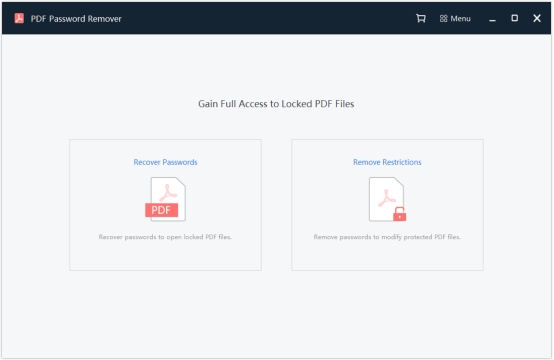
Step 1: Launch the PDF Password Remover.
After opening the program, choose either the Recover Passwords or Remove Restrictions option in the home screen to continue.
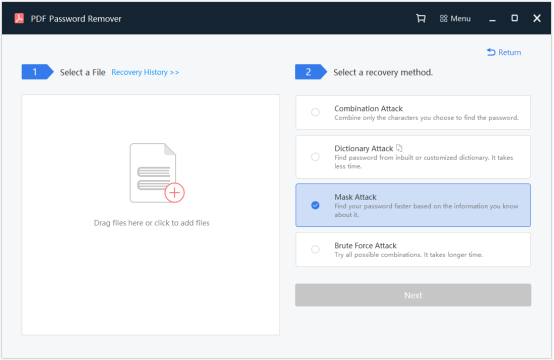
Step 2: Select PDF files and a recovery method.
In the next screen, click the blank box on the left to locate and select the PDF file, or you can directly drag and drop the file there.
On the right side, choose a recovery method from the list. And Click Next.
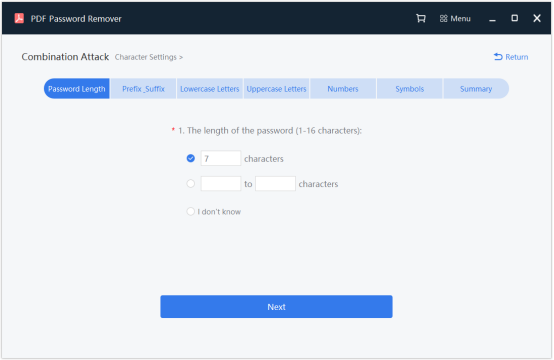
Step 3: PDF password recovery settings.
Before starting to recovering the PDF password, you need to go through a series of settings that help narrow down the range of password lookup.
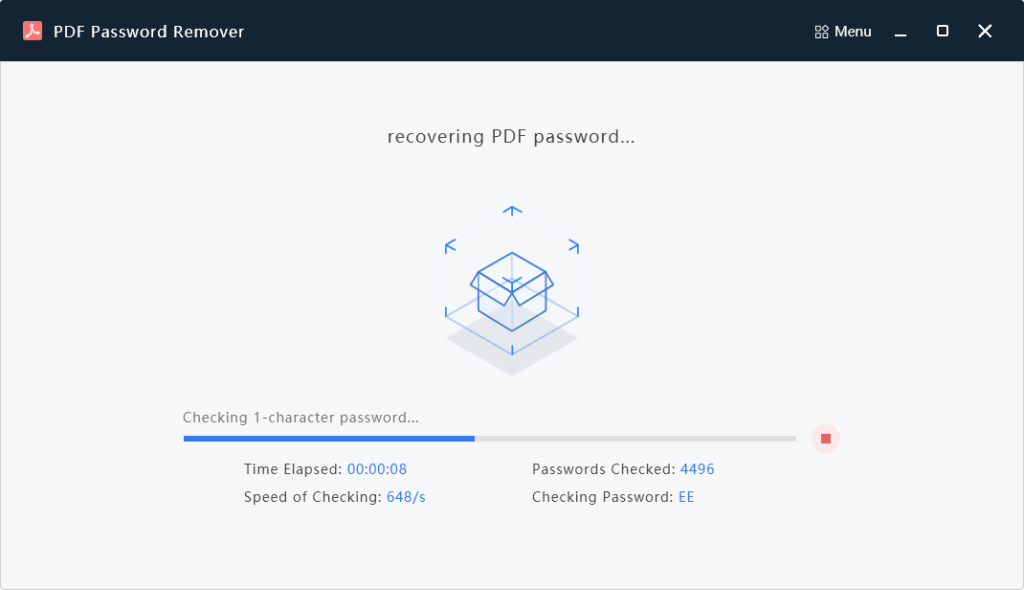
Step 4: Start the PDF password recovery process.
After finishing the recovery settings, Click Recover to start the password recovery process. You will come to the recovery process. Wait a few minutes until it's done.
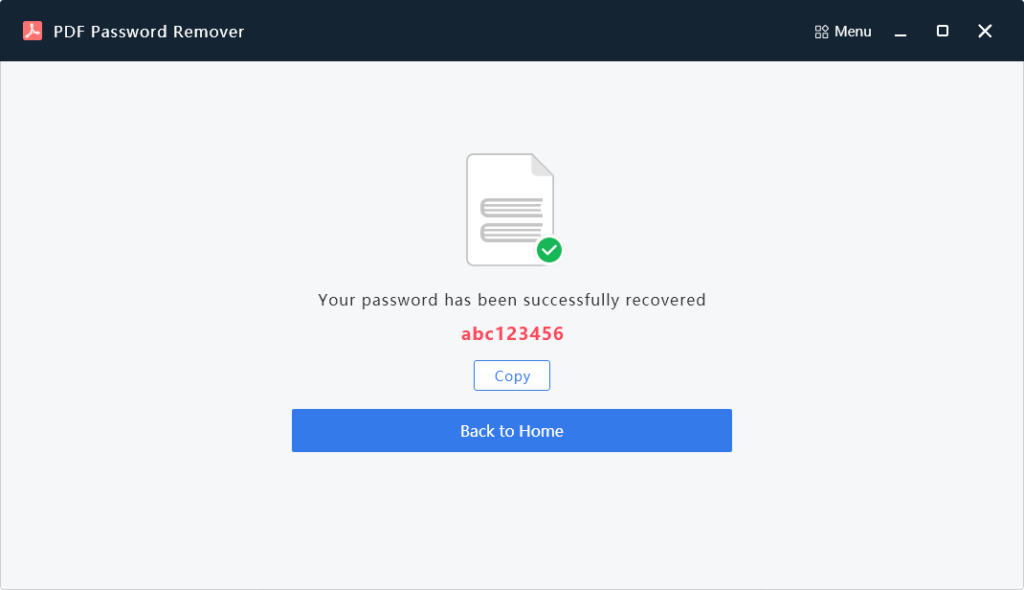
Step 5: Successful PDF password recovery.
You will see this screen after the PDF password has been successfully recovered.
How Do We Recover PDF Password?
We often face this problem that the passwords which we set for our files, we forget them sometimes. We suffer from tension when we need it urgently and are unable to open the file. So, here is the one and the only question that comes to our mind what's the way to open the password, when we don't know much about cracking passwords!
We all want to protect our files, but remembering all the passwords is difficult. It's not easy to break the passwords of files. So, we will discuss the methods of recovering passwords.
Chances Of Recovery
Primarily, people were unwilling to remember a complex password, so they opt to use an easy pattern. However, if you happen to lose this password, we are here to offer you a free trial to check for weak passwords. Our database will search through the commonly used passwords and restore your password in no time. It gives instant results, but the likelihood of success is only 22%.
You can also choose a guaranteed way to get your lost password. Though, it will be a paid password search by a 20+ billion password database. You can expect a 61% success rate in this case, but the search time totally depends on the version of your PDF file. The computing cluster might take 10 minutes or 24 hours to encrypt your document.
Here is a quick overview of the password recovery possibilities.
| Type of Recovery | Time Requirement | Cost | Success Possibility |
| Weak Password Recovery | Within few minutes | Free | 22% |
| Strong Password Recovery | Up to 24 hours | $29 | 61% |
| Brute-Force with a mask | It depends on the complexity of your mask | On request | 100% (if you will provide an accurate mask) |
Process To Remove Password
PDF password is a fundamental component that Adobe acrobat has given to the PDF creator to secure the PDF. Practically all PDF documents can be protected with two kinds of passwords: one is made for the owner, and the other is for the user. Various limitations can also be applied to the PDF like one can view the restricted PDF, or printing and editing can also be done. Before removing the PDF password, it is prescribed to discover first which kind of password you have used to encrypt the restricted PDF document. Only then it's possible to open the password.
There are just two sorts of passwords that you can use to save the data inside your PDF, and these passwords can be applied to any PDF for securing your important data. The security of your data depends on your password's strength and the strength of the encryption method you used. Let's get to know the process in both cases.
Remove PDF Owner Password:
The owner password is mainly used by the creator of the document for copyright protection. You can see the PDF file but can not edit, copy, or print its content. All you can do is remove the protection.
So, just go to the free PDF password remover tool. You can remove the PDF Password with one click. The critical fact is that we can't restore the original owner password; Instead, the owner's password can be removed for free. This tool can help you to remove the passwords within seconds. It's effortless to use, which can facilitate you by just a few steps, and it has a breakneck speed of removing passwords.
Recover PDF User Password:
The User Password can be quickly deleted if you know the password. If the password is lost, then the only way to remove it is to recover it. If you came to our site, then the manual method of recovering passwords did not work.
To restore your forgotten password of a PDF document, we will use our nuclear power, which may take some time, and you need to pay for it. All complex calculations take place in the cloud, so you don't even need to install any programs on your computer for password recovery.
- Our PDF password recovery tool allows you to recover a forgotten user password to a PDF file by doing the following simple tips:
- Just upload your file to our website
- Wait until the password recovery work is over.
After unlocking the restricted PDF document, you will be able to edit, copy or print the content of this file.
Pay After The Successful Attempt
When we successfully complete your requested work, you will receive the original password of the encrypted document. Later on, you can pay according to a specific method's fixed price, whether through brute force or databases.
Why Choose iFindPass for Online PDF Password Recovery?
- It is a program-based website, so no third party is required.
- To make the opening interaction effective, it's available in multiple languages.
- It offers the most straightforward user interface.
- It is a quick process that provides immediate results.
- No expense is charged to open a weak PDF password.
- Free from any danger to use the data because when the PDF gets recovered and downloaded, the PDF document naturally gets erased within 60 minutes.
- During the password recovery process, quality is never compromised, and all the data stay safe.
- No advance payment; you can pay after successful recovery of your password.
Frequently Asked Questions
1- What Is The PDF User Password?
PDF document open password is another name for PDF user password, which is added when a PDF document is created. After adding the user password, nobody can open or view the file if he doesn't know the restricted PDF document password. In this way, you can only open the PDF if you know the user password.
For the most part, the user password is applied when the data is intimate or distinctly for one individual.
2- What Is The PDF Owner Password?
The PDF owner password is also known as the PDF master password. After adding the owner password to the PDF document, you can open and view the file but will not be able to modify the data like altering, printing, duplicating, remarking, or information extraction.
In straightforward terms, just a PDF owner can make any changes in the PDF document, though, and others only have the privilege to view and read the restricted PDF document without having the opportunity of making alterations. It is the most secure method of encrypting a PDF to avoid any data misuse.
The majority of the online available tools and sites can instantly recover the owner's password, yet it is challenging to break the user password.
These People Trust Us

Literally saved my skin. Very easy to use, and its recovery rate is quite as well as recommended.
– Marshall

I had a really good experience using this site. It didn't consume much time to recover my password. For me, the most beneficial feature was the quick process as the pdf was for my final university project and the file was inaccessible at the last moment.
– Leona

This site has impressed me with their multiple language access as I feel more comfortable with Spanish than English.
– Martha

The best thing about this site is that they keep your file secure, and you have to pay after the recovery of your password. Secure and reliable as I never got any virus in my device. Recommended!
– Kimberly
Best 8 PDF Password Removers
Many hackers actively try to access your important data to harass you then. That's why you should use a password to protect your PDF files from unethical hackers.
Unfortunately, many people often forget their PDF passwords and lose important data. Luckily, you can get your integral files back by using a tool to remove the encryption on your files.
Due to massively growing technology, you'll find a lot of PDF password removers in the market, but only a few of them are worth your time.
Passper for PDF
Passper for PDF is arguably the best PDF password remover that allows you to recover your PDF password pretty quickly.
Moreover, this tool also helps you eradicate any trouble while printing, editing, or altering a PDF file.
In addition, Passper for PDF also comes with CPU and GPU acceleration technology that allows you to serve your purpose in a befitting manner. Furthermore, it also possesses a smart algorithm that helps you access any PDF file password.
Pros
- It works pretty fast.
- Passper for PDF is compatible with all Adobe Acrobat versions.
- It supports all the Windows OS.
Cons
- It requires a lot of storage from your computer.
PDF Crack
If you've accidentally forgotten the password of your PDF, you can take the services of PDF Crack.
Another prolific password remover comes with an excellent user interface to serve your purpose better than you expect.
You can use either the wordlist method or brute force to recover owner and user passwords using this tool. Moreover, PDF Crack is compatible with all PDF versions, making it a tremendous and reliable tool.
Pros
- It recovers both owner and user passwords.
- PDF Cracker works quicker than you think.
- It is compatible with all versions of PDF.
Cons
- It only allows you to remove PDF file passwords, meaning you can remove restrictions using it.
GuaPDF
Many people use a password to protect their PDF files from unauthorized access. Unfortunately, if you tend to forget that password, accessing your PDF files will not be possible despite the individual who created the file.
Luckily, GuaPDF Decrypter can turn out to be a huge helper for you by offering you to recover any PDF file password you want.
You can easily get back both the owner and user passwords on different PDF files using this extraordinary tool.
In addition, it also allows eliminating restrictions on your PDF files while printing or modifying files.
Pros
- It helps you to remove every kind of restriction from your PDF file.
- GuaPDF is compatible with Mac OS, Linux, and Windows.
Cons
- It isn't suitable for larger PDF files.
VeryPDF
If you're expecting a reliable PDF password remover tool, you need to try out VeryPDF. It is a remarkable third-party tool that allows you to access any PDF file without using a password. VeryPDF comes with a fantastic user interface, meaning you can recover your PDF file password appropriately.
Moreover, it works appropriately on all Windows and is compatible with every kind of PDF file.
Luckily, it doesn't take any time to serve your purpose. Instead, its fabulous features make your job easier than you think.
Pros
- It is pretty easy to use
- VeryPDF helps you recover any PDF file password.
Cons
- It isn't recommended for highly encrypted passwords.
PDFCrypt
Sometimes, you don't like forgetting the important PDF files' password as you don't want to lose the data.
However, you can recover your password using various PDF password removers, and PDFCrypt is one of them.
You won't see many tools like PDFCrypt due to its unique user interface and ability to grant you access to your important PDF files. Luckily, it is compatible with every version of Windows.
Pros
- It offers a pretty slick interface, meaning you can effortlessly recover your protected PDF file's password.
- PDFCrypt runs pretty quickly.
- It is more than effective in removing passwords and restrictions.
Cons
- It would help if you didn't use it for more than 128-bit encryption.
PDF Unlocker
PDF Unlocker is another spectacular tool that allows you to retrieve your PDF files after removing the owner's password
You can use this particular program in every Windows version to remove the forgotten password and then set up a new password.
Moreover, PDF Unlocker is also useful for removing unwanted restrictions from your PDF files. Furthermore, it comes with two different methods to recover your password: brute force recovery method and dictionary password. Moreover, you can only PDF Unlocker appropriate when you opt to install java on your PC.
Pros
- It holds the ability to locate the password within seconds.
- PDF Unlocker comes with two recovery methods to get your job done.
- Surprisingly, it helps you locate passwords at the highest level of encryption.
Cons
- Unfortunately, it runs pretty slowly.
Advanced PDF Password Recovery
If you're to select a tool that can help you break your PDF files' encryption, you need to go for Advanced PDF Password Recovery without a second invitation.
It offers Thunder Tables technology that makes the recovery process lot easier than you imagine. In addition, this tool is also pretty efficient at diminishing the restrictions on your PDF files.
Moreover, it also takes the GPU acceleration on board to speed up the password's recovery process.
Pros
- You can recover the password of all types of PDF files using this tool.
- It allows you to remove and recover both owner and users passwords
- The tool comes in three editions.
Cons
- It demands high-quality computer systems.
Recover PDF Password
Recover PDF Password is also a PDF files' password remover that allows you to recover your important PDF files after setting up a new password. Luckily, this tool is compatible with all PDF versions, meaning a user wouldn't face any issue recovering the password in any PDF file he wants.
Pros
- It also offers you an opportunity to recover your PDF-protected file password in any language you want.
- Recover PDF Password is pretty easy to use.
Cons
- You may feel trouble recovering a highly encrypted password.
Conclusion
Many users opt to use password protection to prevent their important files from unauthorized and unwanted access from hackers.
However, sometimes, it is practical you may forget your PDF file password meaning you won't be able to open your file anymore. But, you can recover your password using the different PDF password removers.
We've explored the 8 best options to remove your password on PDF files. You can use any of the mentioned tools to get your job done.
 English
  العربية
  简体中文
简体中文  繁體中文
繁體中文  Français
  Deutsch
  Italiano
  日本語
日本語  한국어
한국어  Português
  Русский